4 min read



What employees should review before switching on their out-of-office
The countdown is on. A few more approvals, one last handover, a couple of urgent requests – and it’s finally time to log off. The rush before a holiday is often the perfect breeding ground for security mistakes. Permissions are granted without a second thought, links are shared too broadly, or employees access company data from insufficiently protected devices while away.
Many of these risks don’t disappear once employees return. Forgotten permissions, outdated sharing links, and poorly documented handovers can linger for weeks or even months, creating unnecessary exposure long after the holiday is over.
The good news: A few quick checks before leaving can help you switch off with confidence, knowing your data is protected while you enjoy your well-deserved break.
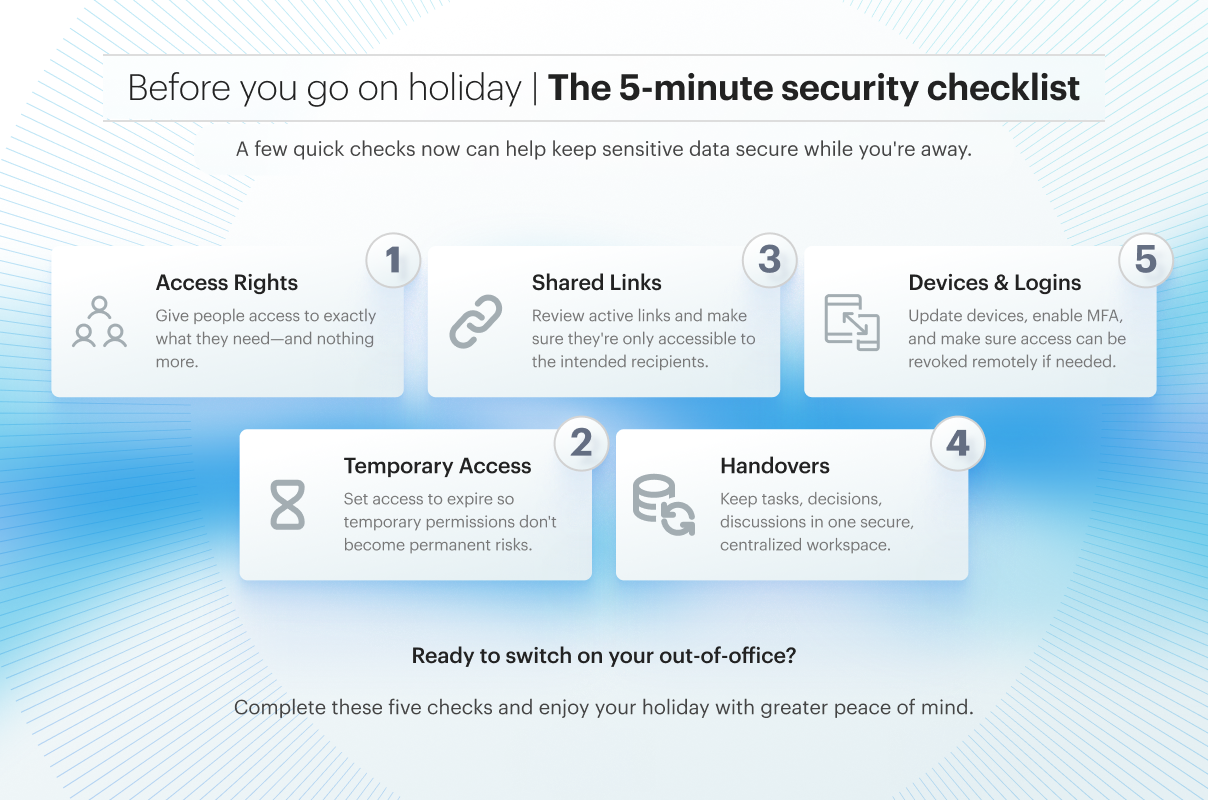
#1 Keep access under control – less is more
Scenario: A colleague covering for an absent team member only needs to review a customer proposal. Instead, they are granted access to an entire contract folder. As a result, they can view, edit, or share far more information than required, increasing the risk of accidental changes, unnecessary exposure, or data leakage.
When assigning permissions, it is not enough to decide who should have access. It is also about deciding how much access they actually need. The more permissions users have, the harder it becomes to maintain control and accountability over sensitive data.
A good rule of thumb is the principle of least privilege: Give people access to exactly what they need – and nothing more.
Security check: Access controls
- Does each person only have access to the files they need during the absence?
- Do temporary replacements have only the permissions required for their tasks?
- Is sensitive information adequately protected during the handover period?
#2 Temporary means temporary – set access to expire
Scenario: While the responsible employee is on holiday, an external legal advisor is granted access to contract documents via a shared link to support ongoing negotiations. Because no expiration date is set, the advisor retains access long after the employee has returned and the matter has been resolved.
Temporary access is easy to forget in the rush of day-to-day work. Over time, former project members, external partners, or service providers may retain access long after their involvement has ended. The result is a growing attack surface and less visibility into who can access which data and why. That's why temporary responsibilities should always be paired with temporary permissions.
Security check: Temporary access
- Do shared links have an expiration date?
- Can access be revoked quickly if a project ends earlier than planned?
- Is there a process for removing temporary access after return, either automatically or manually?
#3 Shared links, shared risk – stay in control
Scenario: A sensitive document is shared internally so a colleague can provide holiday cover. When an external stakeholder reaches out with a question, the colleague forwards the link to keep things moving – unaware that it was intended for internal use only. In an instant, information meant for a limited audience is shared more broadly than originally intended.
The challenge with shared links is that they often travel further than expected. Once customer information, contract drafts, financial data, or personal records leave their intended circle, it becomes difficult to track who has accessed, downloaded, or forwarded them.
That's why secure sharing should go beyond simply generating a link. Features such as password protection, expiration dates, download restrictions, watermarks, and access logs help organizations maintain visibility and control – even when files need to be shared externally.
Security check: shared data and links
- Are links publicly accessible or restricted to specific recipients?
- Are downloads, forwarding, or resharing restricted where appropriate?
- Do you have visibility into who accessed the file and when?
#4 Clear handovers beat confusion and data sprawl
Scenario: A customer calls with a question. The colleague providing holiday cover has access to the relevant documents but lacks key context, such as previous discussions and decisions. To fill the gaps, they involve other team members and share confidential information in chat messages. The reason: critical information is not documented in a central location.
This is where organizational issues quickly become security issues. A structured handover doesn't just help colleagues keep work moving; it also reduces the likelihood that employees resort to insecure workarounds.
Relevant tasks, deadlines, meeting notes, discussions, decisions, and supporting documents should all be managed in a secure access-controlled workspace. Secure client spaces such as Tresorit Engage can help teams keep collaboration and projects organized, accessible, and protected.
Security check: Handovers
- Do colleagues know where to find the information they need?
- Are key project details, meeting notes, and discussions managed alongside relevant tasks and documents?
- Is sensitive project collaboration managed centrally instead of across email and chat conversations?
#5 Travel securely – protect devices and logins
Scenario: The handover is complete, but an employee still plans to check in occasionally while travelling. As a result, their laptop comes along for the trip – until it is lost or stolen. Without the right safeguards in place, a simple travel mishap could turn into a data security incident.
Anyone planning to stay connected while away should secure their devices and accounts in advance. Strong passwords, multi-factor authentication, screen locks, device encryption, and up-to-date software should be standard. Public Wi-Fi networks should be avoided or accessed only through secure connections.
It's also worth minimizing locally stored data and ensuring key security actions can be triggered remotely if the unexpected happens.
Security check: Devices and logins
- Are operating systems, browsers, security software, and business applications up to date?
- Is multi-factor authentication enabled for all business-critical accounts?
- Can devices be remotely disconnected, signed out, or wiped if they are lost or stolen?
Security all year round
These five checks can help reduce common risks before taking time off. But ideally, security shouldn't depend on remembering a checklist every time someone goes on vacation. When secure sharing, access controls, and collaboration are built into everyday workflows, holiday handovers become far less stressful – and much less risky.
That's exactly where solutions like Tresorit help. With a zero-knowledge end-to-end encrypted platform for secure storage, file sharing, external collaboration, and project management, organizations can build security into everyday workflows and maintain control over sensitive information year-round. Not just before an out-of-office message goes live.
Found a few gaps while going through this checklist? Explore how Tresorit SecureCloud can help you close them before your holiday starts.
Share this article