6 min read
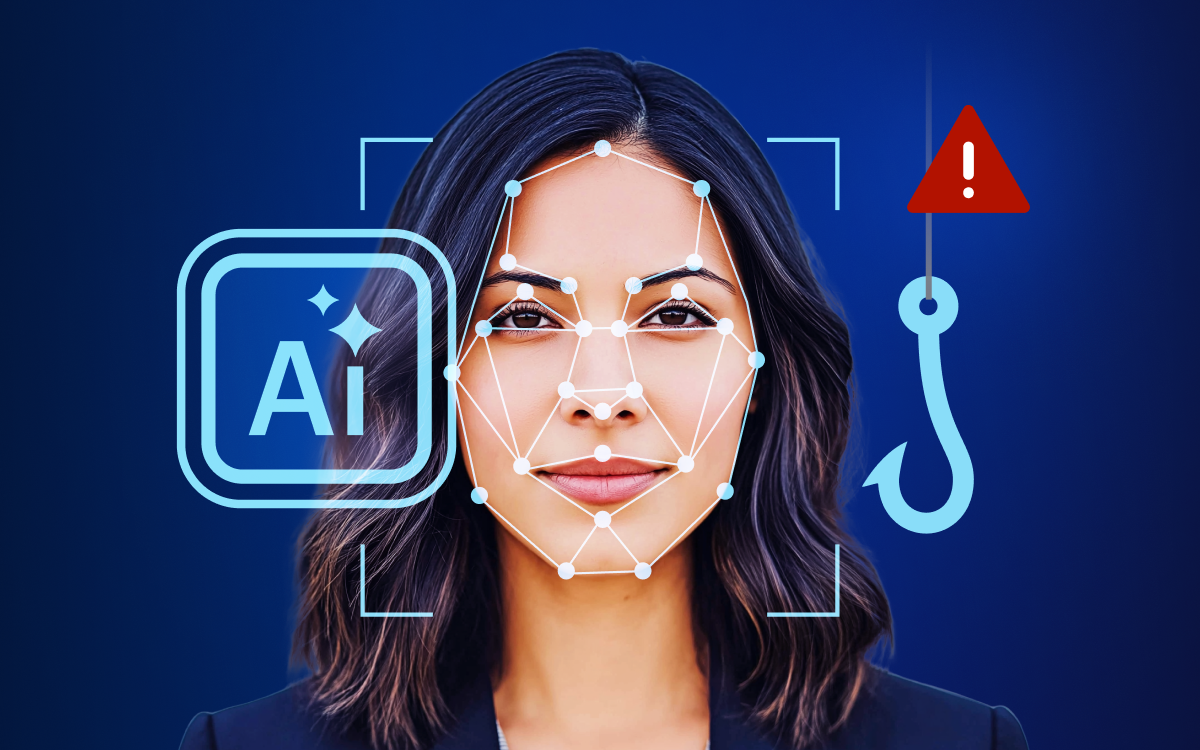


Phishing and social engineering are nothing new. But the rapid evolution of artificial intelligence has made these attacks far more convincing and much harder to detect. Within minutes, attackers can create polished emails, realistic phone calls, and highly persuasive videos. As a result, businesses and employees can no longer rely solely on traditional warning signs. Today, suspicious requests need to be verified through an independent channel.
Imagine receiving an email from a member of the executive team asking for an urgent approval. The language sounds familiar, the tone is right, and the context makes sense. Moments later, a familiar voice calls to confirm that the matter is time-sensitive. Everything seems legitimate, and that's exactly where the risk lies.
What is AI phishing?
AI phishing is a form of phishing that uses artificial intelligence to create more convincing social engineering attacks. Attackers can use AI tools to generate realistic emails, clone voices, create deepfake videos, and personalize messages based on publicly available information about a target.
How is AI changing phishing and social engineering?
In the past, phishing emails often gave themselves away. Awkward wording, suspicious sender addresses, inconsistent branding, or obvious mistakes made them easier to spot. While these red flags still exist, AI helps cybercriminals eliminate many of them.
More broadly, generative AI is transforming phishing attacks, spear phishing campaigns, business email compromise (BEC), and other forms of social engineering. Attackers can now automate reconnaissance, create highly personalized messages, clone voices, and generate convincing deepfake content in minutes. What once required significant effort can now be done quickly, convincingly, and at scale.
While the technology has changed, the goal has not. Attackers still aim to manipulate people into transferring money, sharing credentials, approving access, or revealing sensitive information. Instead of relying on generic mass emails, they can now create context-aware messages that closely reflect a person's job, colleagues, ongoing projects, and business environment.
AI phishing vs. traditional phishing
| Traditional phishing | AI phishing |
| Generic emails | Personalized messages |
| Obvious mistakes | Fluent language |
| Single channel | Multi-channel |
| Mass targeting | Spear phishing |
| Easier to identify | Harder to detect |
These highly targeted attacks are known as spear phishing. Rather than casting a wide net, spear phishing focuses on specific individuals or organizations, making the messages significantly more convincing.
Learn more about the differences in our article: A school of phish: phishing vs. spear phishing, explained
First impressions are no longer enough
In everyday work, employees make countless decisions based on familiar signals. They trust recognizable names, familiar voices, established processes, and commonly used communication platforms. Unfortunately, these are exactly the signals AI can imitate now.
According to iProov's 2025 Deepfake and Digital Trust Report, only 0.1% of participants correctly identified all the real and AI-generated images and videos they were shown. The finding highlights why organizations can no longer rely on employees to detect deepfakes based on visual or audio cues alone.
In other words, a flawless email no longer proves who sent it. A familiar voice is no longer proof of identity. Even a face on a video call may not be what it seems. Organizations that want to defend against modern attacks must move beyond trust based on appearance and make independent verification a routine part of handling sensitive requests.
Five common AI phishing scenarios in the workplace
The following examples illustrate how AI phishing attacks can unfold in day-to-day business operations and where employees need to be particularly vigilant.
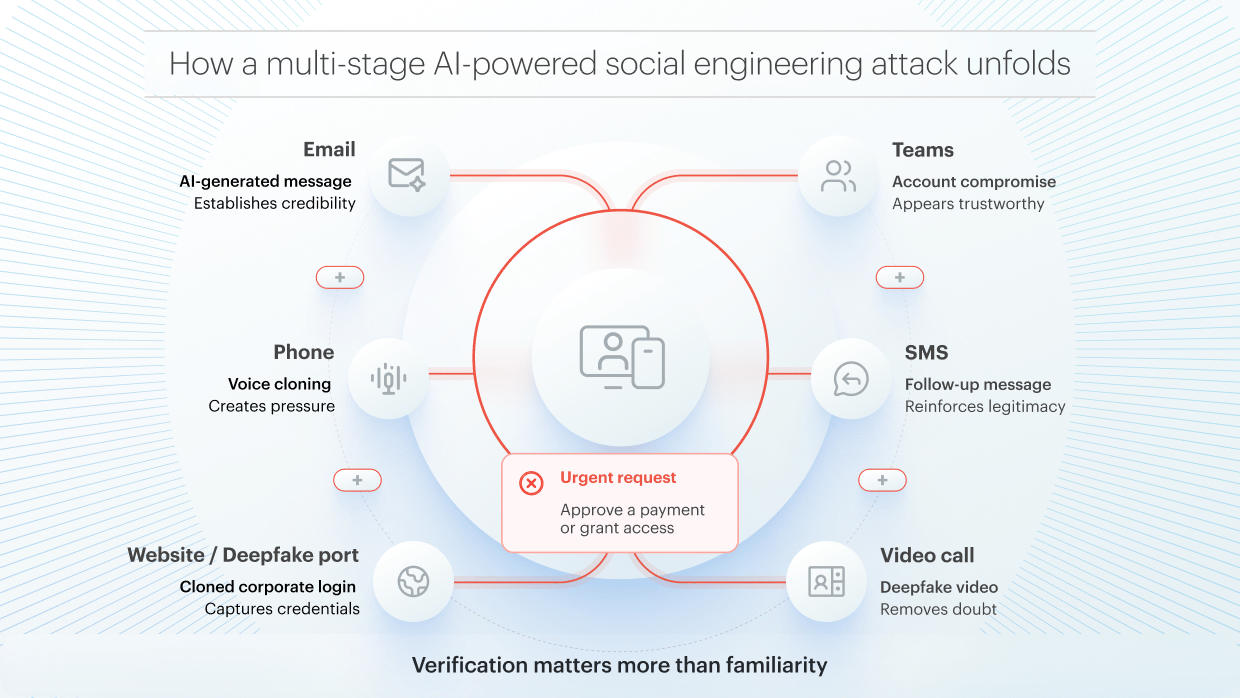
#1 The perfect email: When phishing looks legitimate
An employee receives an email from what appears to be a long-standing business partner. The sender explains that an updated version of a contract is ready and asks the recipient to review it via a link. The project name is correct, the stakeholders involved are familiar, and previous conversations are referenced accurately. Even the writing style closely resembles earlier emails.
Security tip
The more naturally the email fits into an ongoing conversation, the harder it can be to detect a scam. Employees should therefore not only examine the sender's address and link destination but also consider whether the process itself feels consistent with established workflows.
Are contracts normally shared through links? Or are they usually stored in a dedicated project workspace? If something seems unusual, verify the request by contacting the sender through a previously known communication channel.
#2 The call from the boss: AI voice cloning
Shortly after the email arrives, the employee receives a phone call. Voice cloning uses AI to create a synthetic voice that closely mimics a real person. The caller insists that the request is urgent. Perhaps the employee is asked to make an exception, reveal an MFA code, or accelerate a payment.
Security tip
Sensitive actions should always follow clearly defined processes and approved communication channels. For example, payment instructions should only be issued through approved internal channels and then confirmed through a second, independent method.
If such procedures do not exist or the employee feels uncertain, they should end the call and contact their manager using a trusted phone number already stored in company records rather than calling back the displayed number. Standard approval processes, such as dual authorization or finance reviews, should never be skipped because someone claims the matter is urgent.
#3 The executive video call: Deepfake fraud
A senior executive unexpectedly schedules a video call and asks an employee to approve a contract or grant an external partner access to confidential files. The face looks familiar. The voice sounds right. The situation seems legitimate.
Deepfake fraud is a type of social engineering attack in which cybercriminals use AI-generated or manipulated audio, images, or video to impersonate a trusted person. The goal is typically to persuade someone to approve a payment, grant access to sensitive information, or bypass established security procedures.
Security tip
A familiar face on screen should never replace established approval and verification processes.
Employees should be cautious whenever questions are discouraged, the connection quality is suspiciously poor, or when someone pushes for an urgent exception. Instead of relying on what they see or hear, they should confirm the request through an independently verified communication channel.
#4 The Teams or Slack message: Phishing in collaboration tools
A colleague reaches out via Teams and asks for a quick review of a document. The name, profile picture, and writing style all look familiar. However, the link directs you to an external login page instead of the usual project environment.
Security tip
Internal collaboration platforms deserve the same healthy skepticism as email. Employees should assess whether the message aligns with previous interactions and whether documents are typically shared that way. If a link takes users outside their usual workspace or asks them to log in again, it's worth pausing.
Likewise, simply asking for confirmation within the same chat may not be enough. If the account has been compromised, attackers could respond there as well. A quick check through another trusted communication channel is a safer option.
#5 The multi-stage attack: When everything comes together
Modern AI-driven attacks often combine multiple communication channels to increase credibility. An executive announces an urgent contract change by email. Shortly afterward, a familiar voice confirms the request over the phone. Then a Teams message arrives with a link to a document that supposedly requires immediate attention.
Across every channel, the pressure escalates. Deadlines become increasingly urgent, questions are discouraged, and delays are framed as a business risk. The more touchpoints involved, the more convincing the request feels. That's exactly what attackers are counting on.
Security tip
Multiple matching signals should never be confused with independent verification.
When urgency, secrecy, or requests to bypass established procedures enter the picture, employees should pause and verify the request through a trusted channel that is completely separate from the original communication.
Verification over trust
Trust is essential in the workplace. But it becomes a vulnerability when a familiar name, known voice, or commonly used platform is automatically treated as proof of authenticity.
Organizations cannot expect employees to identify every AI-generated deception. Cloned voices, deepfake videos, and highly personalized phishing messages are designed to exploit normal human behavior.
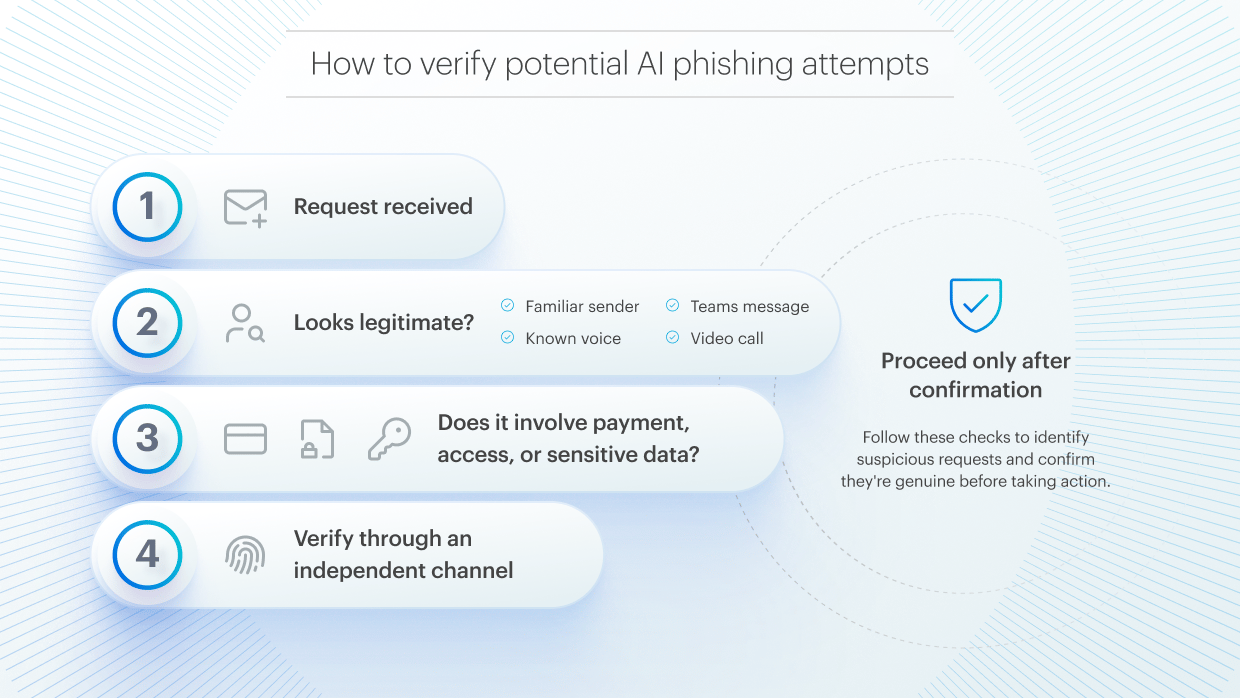
💡Key takeaway: Modern phishing attacks can no longer be judged by how professional they look or sound. Emails, phone calls, chat messages, and even video calls can be convincingly simulated using AI, making independent verification more important than visual or audio cues.
That's why effective protection requires more than awareness alone. Businesses need clear verification procedures, well-defined approval processes, and secure collaboration tools that help control access to sensitive information and reduce opportunities for manipulation.
The most effective safeguards include:
- Verification of sensitive requests through a separate communication channel
- Multi-factor authentication (MFA)
- Dual approval workflows for payments and access changes
- Role-based access and granular sharing controls
- Continuous phishing simulation exercises
- Secure file-sharing and collaboration tools that limit unauthorized access
Checklist: 10 questions to help protect your organization from AI-powered scams
- Do your security awareness programs cover voice cloning, deepfake videos, and manipulation through collaboration tools, not just traditional phishing emails?
- Do employees regularly practice responding to realistic attack scenarios?
- Is it clearly defined which channels can be used for sensitive instructions?
- Do employees know how to independently verify payments, banking changes, access requests?
- Is it clearly defined who can initiate and who can approve sensitive actions?
- Which processes require dual authorization or the four-eyes principle?
- What deviations from standard procedures should immediately trigger additional scrutiny?
- Are employees trained to handle unknown links, unfamiliar login requests, and unusual access permissions?
- Do employees know whom to contact if they suspect fraud?
- Is the reporting process easy to access and use?
Conclusion
AI has not reinvented phishing or social engineering, it has simply made both more convincing and more dangerous. The greatest risk of AI-powered social engineering is its ability to bypass human trust mechanisms at scale. A fraudulent but highly credible message delivered through email, phone, Teams, Slack, or video conferencing can lead to financial loss, unauthorized data access, regulatory exposure, or disruption of critical business workflows.
People cannot be expected to reliably identify every cloned voice, AI-generated email, or deepfake video. What they need instead are well-defined communication channels, proven approval workflows, and secure digital workspaces.
Verification over trust does not mean distrusting colleagues, partners, or customers. It means ensuring that no sensitive action is approved solely because a request appears credible.
Clear processes. Fewer risks.
Tresorit enables secure collaboration across teams and organizations. Built on on end-to-end encryption and a zero-knowledge architecture, it helps businesses protect sensitive information and reduce the risk of AI-enabled fraud - without compromising efficiency. Try Tresorit SecureCloud for Businesses.
Share this article