6 min read
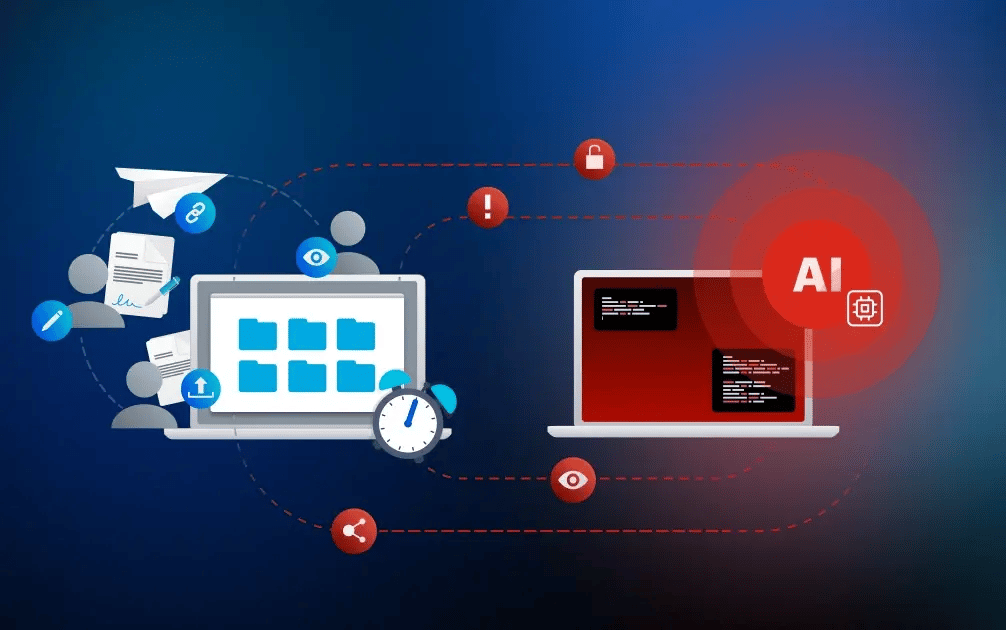


The most effective AI-powered attacks may never have to break through a firewall. If they can persuade an employee to share the right file or approve the wrong person, the workflow itself becomes the way in. As AI makes fraudulent requests more convincing, the human element becomes even more critical. Secure collaboration workflows provide an essential layer of protection at these decision points, helping employees verify recipients, limit access, and prevent a single mistake from exposing sensitive information.
What are AI-powered attacks? AI-powered attacks use artificial intelligence to automate, personalize, or enhance cyberattacks, making them more convincing and more difficult to detect. Examples include AI-generated phishing, deepfakes, social engineering, automated vulnerability scanning, analysis of publicly available company information, and AI-assisted malware variants. These attacks become particularly dangerous when employees have to make quick decisions about files, access permissions, and approvals.
The blind spot in many security strategies: workflow security
According to the Verizon Data Breach Investigations Report 2024, 68% of breaches involved a non-malicious human element, such as a person falling victim to social engineering or making an error.
As AI-powered attacks become more sophisticated, exploiting those everyday decisions becomes easier and more scalable. Attackers can now reproduce writing styles, voices, and visual content with enough accuracy to make fraudulent requests appear legitimate. For practical guidance on identifying these threats, read “How to Recognize AI Phishing and Deepfake Fraud.”
The challenge is no longer simply identifying suspicious links or poorly written emails. What happens when an AI-generated request looks exactly like a normal business interaction? A message may appear to come from a trusted colleague, customer, supplier, or executive. It may reference a real project, use accurate business terminology, and create a sense of urgency around a deadline. Believing the request to be genuine, an employee may share a document, generate a public link, or approve external access without further scrutiny.
At that point, the attacker is no longer attempting to bypass technical controls. They are exploiting the collaboration workflow itself.
Why perimeter security is no longer enough
Firewalls, identity management, password policies, email security gateways, and network segmentation remain essential components of cybersecurity. However, they primarily protect the organization's technical perimeter.
Modern work rarely happens within clearly defined boundaries. Employees access information from multiple locations and devices. They exchange files with clients, suppliers, consultants, and partners through cloud platforms. Throughout the day, they move between email, chat applications, video meetings, and digital workspaces.
As a result, many security risks no longer emerge at the edge of the network. They emerge inside day-to-day collaboration processes. This is where many AI-powered attacks are most effective. Attackers increasingly target decisions rather than systems. They do not need to exploit software vulnerabilities if they can persuade someone to provide access on their behalf.
Modern cybersecurity therefore requires a second layer of protection: workflow security. The central question is no longer simply whether a company’s systems are secure. Organizations must also ask: How can we ensure that sensitive files, approvals, and access decisions remain controlled throughout everyday collaboration?
Workflow security protects the processes through which people share files, grant access, and collaborate internally and externally. Its purpose is to keep sensitive actions controlled, traceable, and reversible throughout the collaboration lifecycle.
Four everyday workflows targeted by AI-powered attacks
AI amplifies human error most effectively where speed, routine, and trust intersect. Organizations that rely entirely on employee vigilance leave too much responsibility to individuals working under pressure.
The following four risk moments are especially common in modern file workflows.
1. Sharing files under time pressure: “I’ll just send the file quickly.”
Rushed file sharing has always presented a security risk. AI increases that risk by enabling attackers to imitate familiar writing styles and make fraudulent requests appear to come from trusted customers, suppliers, or executives.
AI-generated document requests can include realistic project details and convincing business context. When employees are under pressure, they may prioritize speed over security and share sensitive files through email or chat rather than using approved file-sharing workflows.
Tip: Secure file sharing must be as simple as sending an attachment.
Collaboration platforms that combine end-to-end encryption with intuitive controls make it easy to protect files with password protection, recipient verification, expiry dates, or watermarks without disrupting productivity.
2. Open links that outlive the project: “It’s only temporary.”
A file-sharing link may be intended for a short-term project. Without proper controls, however, that same link could remain active for months or years. Open links present a particular risk because they can be forwarded, reused, or accessed by anyone who obtains the URL. AI makes these links easier to target by helping attackers identify projects, map relationships, and gather contextual information at scale.
Tip: Temporary projects should come with temporary access.
Use expiry dates, restrict access to verified recipients, and remove permissions when collaboration ends.
3. AI-powered impersonation: “The request came from my manager.”
Whether it arrives by email, chat, or as a file request, employees are less likely to question a message that appears to come from a colleague, manager, or known business partner.
AI enables attackers to create highly personalized requests. The more familiar the sender and context appear, the less likely employees are to verify the request. AI-powered phishing therefore increases the likelihood of successful identity fraud and business email compromise.
Tip: Access requests involving confidential files should be confirmed through a second, established communication channel. Multifactor authentication, sender verification, role-based access, and clearly defined approval processes provide additional safeguards.
4. Predictable workflows: “We’ve always done it this way.”
Established workflows help teams work efficiently. But predictability can also provide attackers with a roadmap.
AI can analyze communication patterns, recurring approval processes, and frequently repeated tasks. If the same document is regularly sent to the same external recipient by the same employee, attackers may be able to replicate the request and surrounding context with surprising accuracy.
Tip: Familiarity should never replace verification. Secondary reviews, dual approvals, and independent verification steps can help detect convincingly imitated requests.
Reducing human error in AI-powered attacks: a practical checklist for organizations
-
Which sensitive files are being shared outside approved tools?
-
Do employees and external partners have access only to the files they need?
-
Which sharing links remain active longer than intended?
-
Do external links have expiry dates and recipient-level access restrictions?
-
Can sharing links and access permissions be revoked immediately when necessary?
-
Are file views, downloads, and other file activities logged?
-
Are there clear rules and policies for external file sharing?
-
Do employees know when and how to verify unexpected file requests?
-
Do approved tools make secure file sharing easier than risky workarounds?
-
Are unauthorized collaboration tools and other forms of shadow IT reviewed regularly?
Why security awareness training cannot carry the full burden
Security awareness training remains an important line of defense, but it cannot be the only one. Even experienced employees can be deceived by a well-crafted AI-generated request that mirrors a trusted colleague, references a real project, and arrives during a busy workday.
Employees make hundreds of decisions while switching between emails, chats, meetings, and documents. AI-powered attacks make these decisions harder by creating messages that appear increasingly authentic.
The goal is not to eliminate human judgement. The goal is to design workflows that support good decisions and limit the impact of inevitable mistakes. Instead of expecting every employee to make the correct choice every time, organizations should implement controls that help prevent, contain, or reverse mistakes before sensitive information is exposed.
Secure collaboration depends on secure file workflows
Organizations cannot eliminate human error. Nor can they remove the time pressure and complexity of modern work. What they can do is create an environment where the most secure way to collaborate is also the easiest.
That requires secure workflows for sharing sensitive files, verifying recipients, approving access, and monitoring external collaboration. These controls reduce the burden on employees by protecting sensitive information before, during, and after it is shared.
But they are only effective if people use them. If secure sharing is too complicated, employees may revert to attachments, personal cloud storage, or other unapproved solutions. These workarounds create shadow IT and reduce organizational visibility and control.
Choosing a secure collaboration solution therefore involves more than finding a place to store files. It requires protecting information throughout the entire collaboration lifecycle.
Workflow security with Tresorit
Tresorit helps organizations build security directly into everyday collaboration workflows. Teams can share sensitive files with end-to-end encryption, set granular access controls, and securely collaborate with internal teams and external stakeholders while maintaining productivity:
-
Protect files: Zero-knowledge end-to-end encryption keeps content secure from sender to authorized recipients. Not even Tresorit can access unencrypted files.
-
Control access: Granular sharing controls, including password protection, email verification, and expiry dates, let you define who can access each file and for how long.
-
Track activity: Detailed audit logs provide visibility into who accessed, downloaded, or shared your files and when.
-
Stay in control: Link revocation and remote wipe help contain accidental sharing, compromised access, or device loss.
-
Keep sharing simple: Intuitive sharing and familiar integrations into Outlook and Microsoft help employees stay within approved workflows.
- Secure external collaboration end to end: Manage confidential projects from onboarding to sign-off in encrypted, branded Engage rooms.
All these controls and solutions are designed to help prevent, detect, contain, or reverse mistakes before they lead to uncontrolled access.
When is Tresorit a good fit?
Tresorit is particularly well suited for organizations that regularly share confidential or regulated information, both internally and externally. It is often a strong fit when security and compliance are business-critical requirements. Key use cases include:
- Exchangig sensitive files with employees, customers, partners, or suppliers
-
Supporting secure collaboration within Microsoft 365 workflows
- Managing confidential external collaboration and complex projects
When might another solution be a better fit?
Businesses focused primarily on general productivity features or low-risk information sharing may find a broader collaboration platform sufficient.
Discover how Tresorit SecureCloud, Tresorit FileSharing and Tresorit Engage helps organizations protect sensitive information throughout the entire collaboration lifecycle.
Brigitta Finta
View more articles from this author
Share this article