4 min read



Meaning lives in context, not in files
The AI hype has made one thing painfully clear: context is everything. But long before machines struggled without it, people did too. Even with powerful tools at their fingertips, teams still waste time asking the same questions: What was decided, and why? Who was involved? What changed since then? Meeting outcomes live in emails and chat threads. Project context hides in personal notes. Q&As sit in documents nobody can find anymore.
At Tresorit, we see fragmented workflows and missing context as a challenge across teams, clients, and partners collaborating on sensitive data. Tresorit Engage was designed to solve exactly that – by bringing collaboration, workflows, tasks, and files together into one secure, branded portals. Our newest updates take this even further – with shared knowledge, reusable workflows, and room-level oversight, built right into your fully encrypted Engage rooms. Read on to discover what’s new and how to turn collaboration from a series of interruptions into a continuous flow.
“All project information is stored centrally in the data rooms. This saves us a significant amount of time – we don’t need meetings or conversations about where the project stands. If they want to see the status they can just go to Engage — in fact, it saves us up to one full workday per week.”
Mick Deben
–Cyber Security Consultant, DMC Group
Engage pages – shared knowledge finally has a place
People cannot process information in isolation. Context turns files into insight and information into action. Scattered information creates friction in collaboration, slows teams down, and pushes sensitive data into risky workarounds.
Research underpins this. One of the largest meta-analyses published in the Journal of Applied Psychology 2009, covering 72 independent studies and over 17,000 individuals, found that information sharing boosts team performance. Tools that keep knowledge connected to work improve the human experience of teamwork: People can interpret actions, make faster decisions, and move forward with confidence.
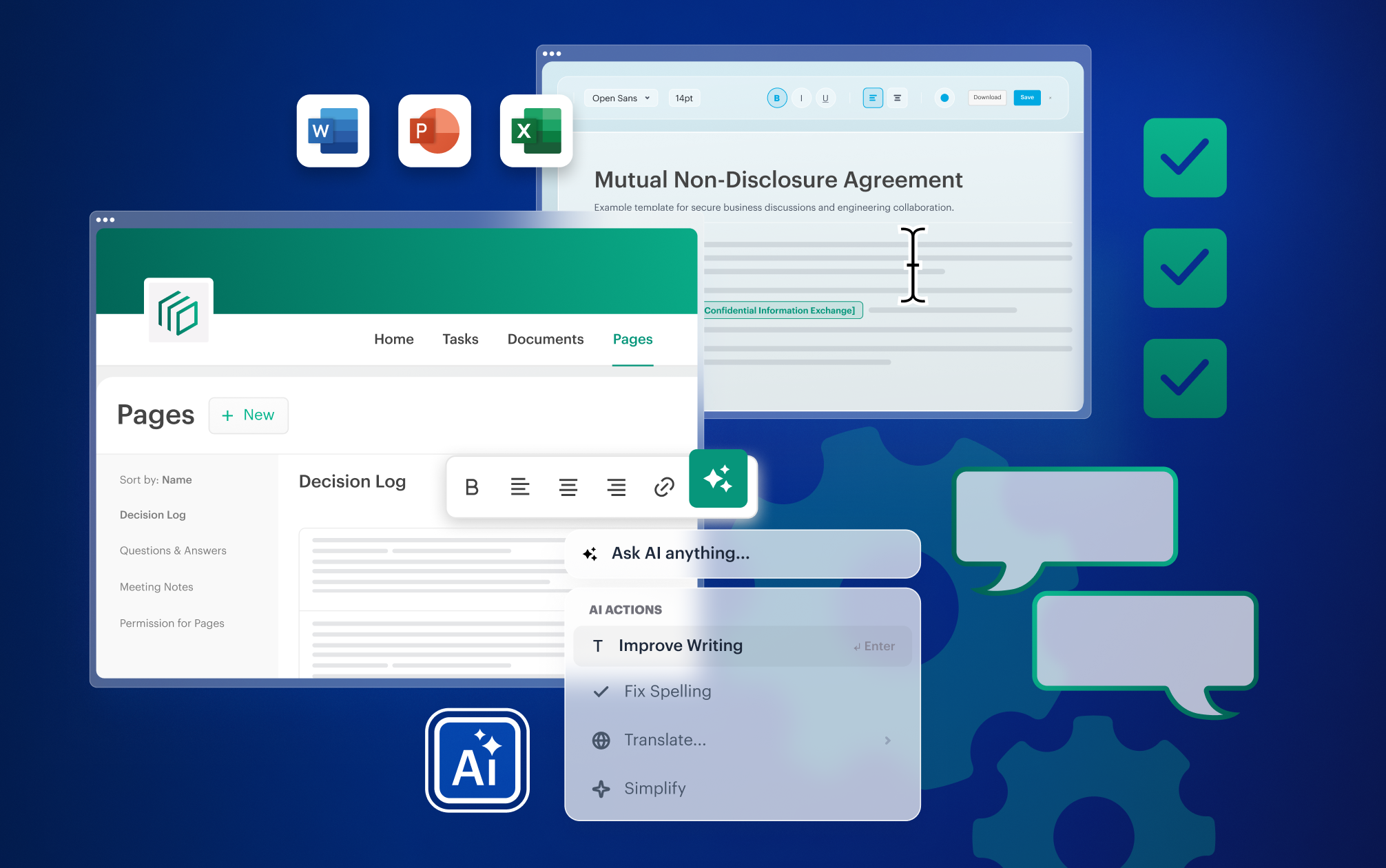
Engage pages are built around that human need: they turn scattered information into shared knowledge. You can capture meeting notes, agendas, Q&As in structured, wiki‑style pages that live inside your Engage rooms – right next to the files, tasks, and people it relates to, not in separate apps. No more hunting through tools or piecing together history from memory. Instead, pages help teams create a single source of truth:
- Meeting notes – capture action items, decisions, and key discussion points, so everyone stays aligned after the meeting.
- Q&A pages: Ask questions, receive answers, capture agreed Q&As, and refer back to them whenever needed.
- Agenda setting: Prepare agendas in advance and keep them visible to all participants, so discussions stay focused and outcomes are clear.
- Decision log: Maintain a living log of decisions, including the rationale and timing, so teams can always understand what was decided and why.
Why pages feel different (and why that matters)
Most teams already use documents or note‑taking apps. The challenge isn’t documenting information, it’s keeping it connected to actual work. In regulated industries, where sensitive information is constantly in motion, disconnected tools don’t just slow teams down, they increase security risks and human error. Engage pages are different by design:
- Instant context, faster progress: Information lives inside your secure rooms, not in separate apps. Knowledge stays up to date, easy to find, and immediately relevant to what you, your teams, clients, and partners are working on.
- Sensitive information, end-to-end encrypted: Confidential content remains protected inside your fully encrypted workspace and under the control of its owners – reducing the risk of oversharing or leakage across disjointed, unsecure tools.
- Familiar editing; living knowledge base: Create clear wiki‑style pages with headings, structured layouts, and various sorting options. Link related pages so information grows into a usable knowledge base – not a dumping ground.
- Clear role-based governance, by default: Permissions follow existing room roles. It’s always transparent who can view, edit, or create pages, so collaboration stays controlled and compliant.
Engage templates – start with structure, not from scratch
If context drives effective collaboration across your teams, clients, and partners, it matters just as much before the first task is created. And yet many projects still begin with a familiar ritual: rebuilding workflows, copying folders, reassigning roles, and trying to remember how this was done last time. Knowledge lives in someone’s head or in a workflow document archived six months ago.
At first, it feels efficient. After months, it becomes exhausting. These small rebuilds and shortcuts lead to inconsistency, lost time, and growing compliance risks. Each slightly different setup creates uncertainty: Which process are we following this time? Which documents do we need? Shall we request a signature again?
Engage templates turn what already works into a reliable starting point – helping you build consistent, repeatable workflows. They preserve workflows with structure, context, and tasks from project to project, from client to client. Alongside our existing industry-specific templates available under “By Tresorit”, template creation is now even more flexible. Instead of rebuilding setups, you can create, share, reuse, and turn any Engage room into a template – here's how:
- Build templates your way: Create templates from scratch and reuse them from “My Templates” whenever a new collaboration starts – with tasks, files, and context ready in just a few clicks.
- Share templates across teams: Make proven setups available, so others can easily find them in “Shared Templates” and start from the same standard every time.
- Turn any room into a template: Save successful room setups as templates and carry that knowledge forward into the future.
- Keep control over how templates are used: Decide who can edit or reuse templates, protecting critical workflows while still enabling best-practice sharing.
Activity logs – accountability that builds trust
Context isn’t only about supporting teamwork, but also about understanding what’s happening in your workspace. When collaboration spans teams, customers, partners, and time zones, oversight matters. Without it, progress is hard to track, incidents are difficult to investigate, and audits turn into reconstruction exercises. Who accessed what? When was a page created, edited, or deleted? Was a task completed, viewed, or updated?
It makes a huge difference whether those answers come from memory or from reliable data – and whether that data is scattered across tools or available in one place. Industry case studies, including examples cited by MDaudit, highlight how structured audit workflows can substantially reduce administrative audit effort – with reductions of up to 50% reported in practice.
Activity logs in Engage turn uncertainty into clear, actionable insights. They give you a complete, room-level view of what’s happening in your secure data rooms – from file access and views to task updates and activity history.
When audit logs matter most:
- Progress monitoring: See who did what and when, directly at the room level – without chasing updates
- Confidence for audits: Stay compliance-ready at all times, with detailed, exportable audit records.
- Fast incident investigations: Respond quickly when it matters most with timestamped activity logs.
- Oversight for sensitive content: Monitor activity in HR, legal, or finance rooms to prevent misuse and data leaks.
Engage – designed for secure, context-rich collaboration
Engage is built to support how people actually work – keeping context close to the work as collaboration unfolds. Pages capture shared knowledge. Templates preserve what works in consistent workflows. Activity logs ensure that when questions arise, the answers are already there. So teams spend less time searching, rebuilding, or retracing steps – and more time delivering outcomes with and for customers and partners.
Learn more about Tresorit Engage or see Engage pages in action and discover how context transforms secure collaboration.
Brigitta Finta
View more articles from this author
Share this article