7 min read



Files move through almost every important enterprise workflow. Legal teams exchange contracts with external counsel, finance departments send records to auditors, product teams share specifications with suppliers, and security teams distribute vulnerability reports containing details that could cause serious damage in the wrong hands.
These exchanges now span cloud platforms, hybrid workplaces, mobile devices, international supply chains, and AI-enabled applications. Protecting a file is therefore no longer just a matter of securing an email attachment or adding a password to a download link. Organizations need to control who can access information, what recipients can do with it, how long access lasts, and whether every action can be investigated later.
An enterprise file-sharing security strategy brings these controls together without making collaboration unnecessarily difficult. The following six tips explain the core requirements and how organizations can evaluate tools against real business workflows.
What are enterprise file-sharing security tools?
Enterprise file-sharing tools allow employees and authorized external parties to share, access, and collaborate on files under centrally managed security policies. They combine file exchange with capabilities such as identity-based access controls, encryption, administrative oversight, activity logging, retention rules, and external-sharing governance.
A suitable platform should protect information throughout its lifecycle. This includes when a file is uploaded, stored, synchronized, shared, downloaded, edited, revoked, archived, or deleted.
Consumer tools, by contrast, are primarily designed to make personal storage and link sharing convenient. They may offer basic encryption and password-protected links, but they do not always provide the administrative controls, audit evidence, identity integrations, or retention capabilities required across a large organization.
|
Enterprise vs. consumer file-sharing tools |
|
| Consumer-oriented file sharing tools | Enterprise file-sharing tools |
| Simple link-based sharing | Identity-based, controlled sharing |
| Limited administrative controls | Centralized administration and policy enforcement |
| Encryption typically focused on data in transit and at rest | Advanced encryption options, including E2EE and zero- knowledge architectures |
| Limited visibility into file activity | Detailed and exportable audit logs |
| Manual access management | Expiration, revocation, and automated offboarding |
| Primarily designed for personal storage and sharing | Designed for governance, compliance, and controlled collaboration |
Enterprise tools must help security and IT teams answer practical questions:
-
Who owns the information?
-
Who can currently access it?
-
Was it viewed, downloaded, edited, or reshared?
-
Can access be revoked after a file has been sent?
-
What happens when an employee or contractor leaves?
-
Where is the data stored?
-
Who controls the encryption keys?
-
Can administrators produce reliable evidence for an investigation or audit?
Enterprise file-sharing security goes beyond secure file exchange. It combines identity controls, policy enforcement, administrative oversight, and audit trails to protect information throughout its lifecycle.
1. Make end-to-end encryption part of a layered security model
Cloud computing enables enterprises to scale collaboration quickly, but it also changes how and where information is processed. Encryption should therefore be considered an architectural and procurement requirement from the outset, rather than a security feature evaluated only after deployment.
Most established cloud services encrypt data both in transit and at rest. Encryption in transit protects information as it moves between devices and servers, while encryption at rest protects data stored on the provider’s infrastructure. Both are essential security measures, but they do not necessarily prevent the service provider from accessing the underlying content.
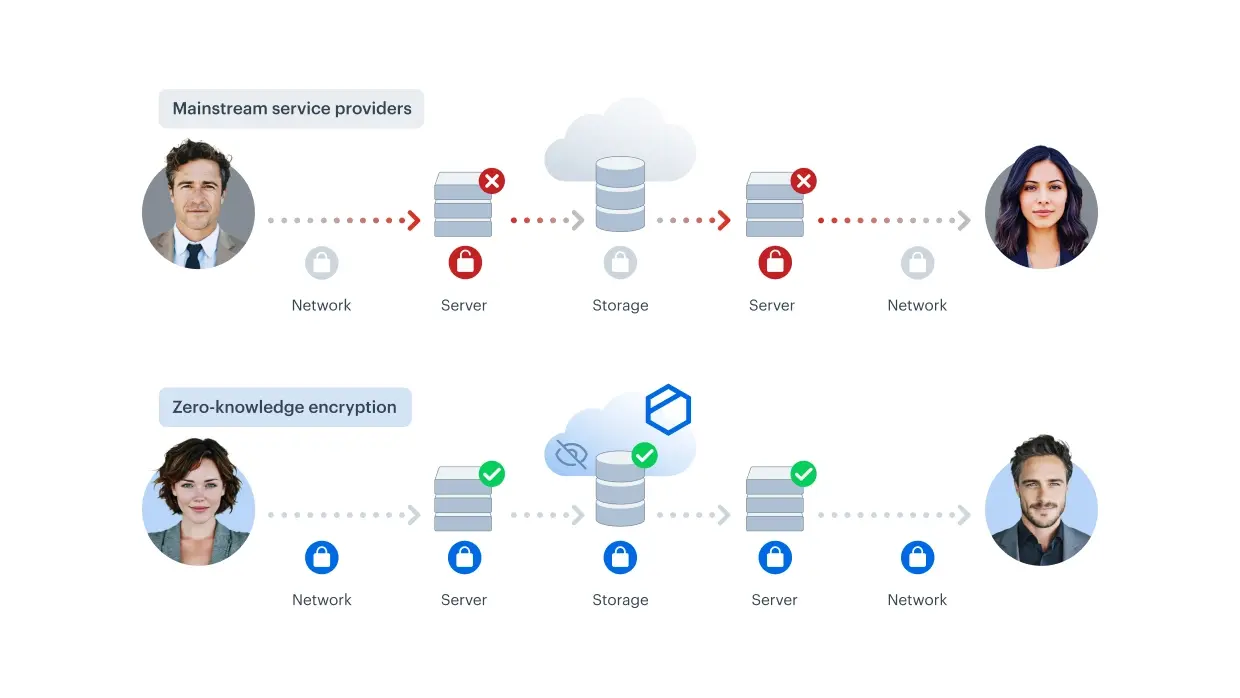
End-to-end encryption (E2EE) uses a different security model. Data is encrypted before it leaves the user’s device and can be decrypted only by parties with the appropriate decryption keys. In a zero-knowledge architecture, the provider does not have access to the keys or other information needed to decrypt customer content. This distinction matters when employees share confidential files. If a cloud account or service is compromised, encryption that still allows the provider to access plaintext may provide less protection than organizations expect.
Encryption should be part of a layered security strategy. It needs to work alongside multifactor authentication, single sign-on, device controls, data classification, malware protection, and granular permissions. Organizations should also examine how encryption keys are generated, stored, and controlled rather than accepting an “encrypted” label at face value. Important questions include:
-
Where are encryption keys generated and stored?
-
Can the provider decrypt customer files?
-
Are keys separated from encrypted content?
-
How are keys recovered and rotated?
-
Are customer-managed keys available?
-
What happens to the keys when data is deleted?
-
Does account recovery weaken the encryption model?
The objective is to prevent unauthorized access without creating workflows so difficult that employees revert to email attachments or unapproved sharing services.
Encryption at rest protects data stored on infrastructure, while end-to-end encryption protects content throughout the entire sharing process. In a zero-knowledge model, the provider cannot decrypt customer files because it does not control the keys required to do so.
2. Map, classify, and protect data assets
Enterprises produce large volumes of unstructured information, including documents, spreadsheets, emails, images, recordings, source files, and presentations. These files often contain highly sensitive business information, yet their dispersed formats and locations can make them more difficult to manage and govern than structured data stored in business applications.
The first step is to identify where sensitive information is created, stored, and shared. This assessment should cover approved cloud platforms, local drives, email, collaboration applications, removable storage, legacy repositories, and portals operated by external partners.
Organizations can then establish classification levels such as public, internal, confidential, and restricted. These labels should lead to clear handling rules. For example, employees might be permitted to share an internal presentation with colleagues through an approved workspace. A restricted vulnerability report, however, may require named-recipient access, end-to-end encryption, disabled downloads, and automatic expiration.
The right file-sharing tool helps enforce these rules instead of relying entirely on employees to remember them. Depending on the use case, this can include restricted workspaces, recipient verification, download controls, expiration dates, watermarking, and integrations with data loss prevention or classification systems.
Classification must also remain understandable. If employees face too many labels or complicated approval processes, they may select the easiest option or move files into an unapproved service. Effective governance makes the secure action easier than the unsafe workaround.
3. Establish access controls and external-sharing policies
External file sharing is essential to business, but every new recipient creates an additional access boundary. A contract sent to outside counsel might later be forwarded to another firm, downloaded to an unmanaged device, or remain accessible after the engagement has ended.
An enterprise policy should specify which information may be shared externally, who can authorize access, how recipients are authenticated, and when that access must expire. Controls should reflect the sensitivity of the information rather than applying the same restrictions to every file. Core capabilities to evaluate include:
- Role-based access control
- Single sign-on and multifactor authentication
- Named-recipient sharing
- Verification for external recipients
- Separate view, edit, upload, and download permissions
- Link and workspace expiration
- Immediate access revocation
- Controls for unmanaged devices
- Automated deprovisioning when employees leave
Auditability is equally important. Security teams need to determine who shared a file, who accessed it, whether it was downloaded, and whether its permissions changed. Activity logs should be searchable, exportable, protected from unauthorized modification, and retained according to the organization’s legal and operational requirements.
Reliable logs support incident response, internal investigations, customer assurance, and regulatory audits. They can also reveal where a workflow needs improvement. If employees regularly bypass an approved process, excessive complexity may be the underlying problem.
Secure external sharing depends on three connected controls: verified recipient identity, limited permissions, and a reliable audit trail. Encryption protects the content, while governance helps ensure that the right person can access it for the intended purpose and only as long as necessary.
4. Regain control of the application landscape
Rapid digitalization has created fragmented application environments in which departments use different tools for storage, messaging, file transfer, signatures, and project collaboration. This creates conditions in which shadow IT can thrive. The risk is not limited to obviously insecure applications. Even a reputable service can expose information when it is used without central administration, approved retention settings, identity integration, or reliable offboarding.
A former contractor might retain access to a project folder, or an employee might create a public link because the approved process takes too long. Enterprises should not attempt to ban every new tool. Instead, procurement and security teams should define minimum requirements for any service that stores or transfers business files. These should address encryption architecture, identity integration, audit logging, data location, deletion procedures, sub-processor transparency, incident notification, and administrative control.
Consolidating sensitive collaboration in fewer governed platforms reduces uncontrolled copies and makes access reviews more reliable. It can also improve productivity by giving employees a clear workflow for sharing information with colleagues and external parties.
5. Secure external collaboration and the supply chain
Organizations routinely exchange files with external parties such as suppliers, law firms, auditors, customers, agencies, and technology providers. Each external relationship can create access to information that internal teams cannot fully control. A supplier does not need broad access to an internal repository simply because it is involved in one project. A safer approach is to provide a dedicated collaboration space containing only the information required for that engagement. Access can then be restricted to named users, limited permissions, and a defined period.
The same principle applies to inbound files. Enterprises need controlled ways to receive sensitive or large documents without relying on email attachments, personal accounts, or public file-upload services. Supply chain incidents also show how a compromise at one provider can expose multiple connected organizations, making controlled file exchange an important part of third-party risk management.
File-sharing governance cannot eliminate third-party risk, but it can limit the amount of information exposed and make unusual activity easier to detect and investigate. Periodic access reviews are therefore essential. Project owners should confirm that external accounts are still needed, that permissions remain appropriate, and that workspaces are archived or deleted when no longer required. Access justified at the start of a project should not remain active indefinitely.
6. Make secure file exchange part of vulnerability management
Security teams invest significant resources in identifying and remediating vulnerabilities, but the sensitive information generated during this work can receive less attention. Penetration-test reports, network diagrams, vulnerability inventories, malware analyses, incident records, and remediation plans can provide valuable insight into an organization’s security weaknesses. Sending these files as ordinary email attachments can create multiple uncontrolled copies. Recipients may download them to local folders, forward them to broader distribution lists, or retain them long after the underlying issue has been resolved.
A secure workflow should use a restricted workspace with named participants, strong authentication, granular permissions, and a complete activity record. Particularly sensitive findings may require end-to-end encryption, disabled downloads, or time-limited access. If an external testing provider is involved, its access should end when the engagement closes.
Security controls must also accommodate the way teams actually work. Analysts may need to upload large files, review remediation evidence, or share a single report with a supplier without exposing the broader vulnerability repository. If a platform cannot support these legitimate requirements, users may turn to less secure workarounds.
How enterprises should evaluate file-sharing security tools
A feature checklist is useful, but organizations should also test potential platforms against representative workflows. These might include sharing a contract with external counsel, collecting records from a customer, distributing board materials, or collaborating with a penetration-testing provider. Evaluate each platform across six areas:
- Security architecture: Establish how files are encrypted, who controls the keys, and whether the provider can access content.
- Access control: Test identity integration, recipient verification, permissions, revocation, expiration, and device restrictions.
- Auditability: Examine the detail, integrity, retention, searchability, and exportability of activity records.
- Governance: Assess support for data classification, administrative roles, offboarding, retention and deletion policies, legal holds, and security integrations.
- Compliance support: Assess data residency, sub-processors, certifications, contractual safeguards, and incident-notification procedures in relation to requirements such as GDPR, NIS2, and DORA.
- Usability: Observe whether employees and external partners can complete common tasks without bypassing controls.
No file-sharing platform makes an organization compliant by itself. Technology can support compliance through encryption, access controls, retention, logging, and contractual safeguards. The organization remains responsible for lawful processing, policies, configuration, risk assessments, and user behavior.
The final decision should balance security with usability and adoption. A platform with strong controls that is too difficult for employees, customers, or suppliers to use may push sensitive collaboration back to email or shadow IT. Rather than relying on claims such as “military-grade encryption,” organizations should examine what the platform actually enables them to control and verify: who can access information, who can decrypt it, who has accessed it, and how access can be limited or revoked throughout a collaboration workflow.
Secure file sharing should protect sensitive information without creating unnecessary friction for legitimate collaboration.
|
See here how Tresorit can help with reliable file sharing. |
This blogpost was written in 2021 and updated in 2026.
Share this article